AVRDUDE Programmer
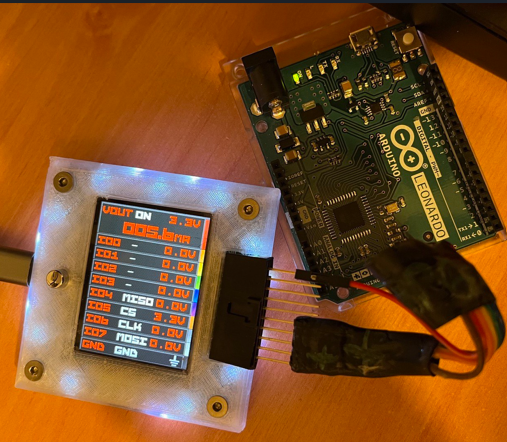
The Bus Pirate can serve as a programmer and dumper for AVR chips, using the command-line utility AVRDUDE.
For those who prefer a graphical user interface, AVRDUDESS offers a user-friendly front-end for AVRDUDE. Both tools together provide a powerful setup for working with AVR chips.
In this demo we’ll program the ATmega32U4 chip found on the Arduino Leonardo through the ICSP header.
Always power the AVR target board externally (e.g., via USB). It usually works better than powering it only from the Bus Pirate.
Connections
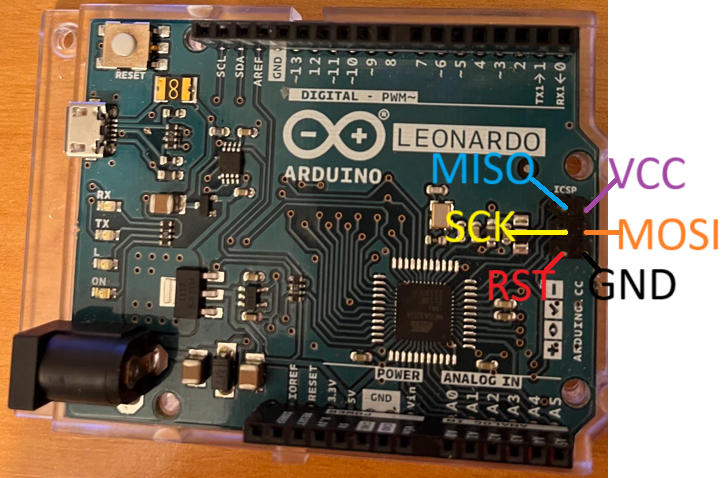
| Bus Pirate | Arduino Leonardo | Description |
|---|---|---|
| MISO | ICSP-1 | Master In Slave Out |
| VOUT | ICSP-2 | Power Supply (5 volts) |
| CLK | ICSP-3 | Clock |
| MOSI | ICSP-4 | Master Out Slave In |
| CS | ICSP-5(RST/RESET) | Chip Select |
| GND | ICSP-6 | Ground |
Connect the Bus Pirate to the ICSP header according to the table above.
RESET is connected to the CS pin on the Bus Pirate. The CS pin is used to reset the AVR chip.
Setup
HiZ> binmode

 1. SUMP logic analyzer
 2. BPIO2 flatbuffer interface
 3. Arduino CH32V003 SWIO
 4. Follow along logic analyzer
 5. Legacy Binary Mode for Flashrom and AVRdude
 6. IRMAN IR decoder (LIRC, etc)
 7. AIR capture (AnalysIR, etc)
Select binary mode
x to exit (1) > 5

Binmode selected: Legacy Binary Mode for Flashrom and AVRdude
Binmode active. Terminal locked
In the Bus Pirate terminal use the binmode command to select the “Legacy Binary Mode for Flashrom and AVRdude”.
Set OUTPUT HOLD(IO2) & WP(IO3) pins? (no=INPUT)
y/n, x to exit (Y) > n

Clock on IO0 for avrdude -x cpufreq?
y/n, x to exit (Y) > n

Power supply
Volts (0.80V-5.00V)
x to exit (3.30) > 5

Maximum current (0mA-500mA)
x to exit (200.00) > 150

Power supply set to 5.00V, 150mA

Done! Just execute flashrom or avrdude using the binary com port
To exit: press the button, or type 'q' here and confirm with 'y'.
Either way the Bus Pirate resets on exit.
First it asks about the HOLD and WP pins: answer n, they are not used here. The IO0 clock is only for an AVR without a crystal (see below): the Leonardo has one, so answer n. Then select 5 volts and a current limit of 150 mA.
The terminal is locked in this mode. To exit, press the button, or type q and confirm with y.
Arduino Leonardo runs at 5 volts. Make sure the Bus Pirate power supply is set to 5 volts.
Dumping Flash memory
Command Line
avrdude -c buspirate -P COM5 -p m32u4 -U flash:r:dump.bin:rThis command uses avrdude to read the flash memory of the ATmega32U4 and saves it to a file named dump.bin.
- The correct COM/serial port is the Bus Pirate binary interface, this is not the same as the terminal serial port used to enter binmode.
- For Linux, the serial port usually starts with
/dev/ttyUSB
attempting to initiate BusPirate binary mode ...
avrdude: paged flash write enabled
avrdude: AVR device initialized and ready to accept instructions
avrdude: device signature = 0x1e9587 (probably m32u4)

avrdude: processing -U flash:r:dump.bin:r
avrdude: reading flash memory ...
Reading | ################################################## | 100% 42.14 s
avrdude: writing output file dump.bin

avrdude done.  Thank you.
AVRDUDESS
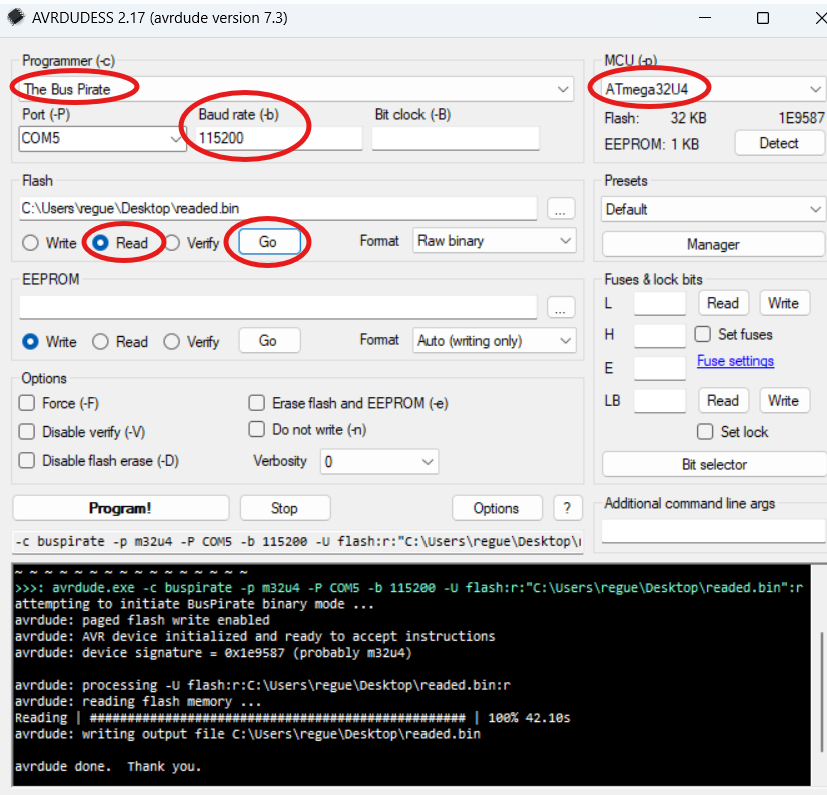
Using AVRDUDESS is easy and straightforward. Just select:
- “The Bus Pirate” as the programmer
- ATmega32U4 as the target (MCU)
- Port COM (the port where the Bus Pirate binmode is connected)
- Baud rate: 115200
Select “Read” and click “Go” button to dump the flash memory.
Never select “The Bus Pirate bitbang interface, supports TPI” as the programmer. It will not work.
AVR without a crystal
An AVR whose fuses select an external clock needs a clock on XTAL1 before it can be programmed. Answer y to “Clock on IO0 for avrdude -x cpufreq?”, connect IO0 to XTAL1, and give AVRDUDE the frequency in kHz (125 to 4000):
avrdude -c buspirate -P COM5 -p m328p -x cpufreq=4000 -U flash:r:dump.bin:rIO0 gives the clock while AVRDUDE runs; firmware that does not ask this question has no clock on IO0. Keep the SPI clock under a quarter of that frequency: the default 30 kHz works with any -x cpufreq, and with -x cpufreq=4000 you can go up to -x spifreq=2 (250 kHz).