PS/2 & USB Keyboard Sniffer
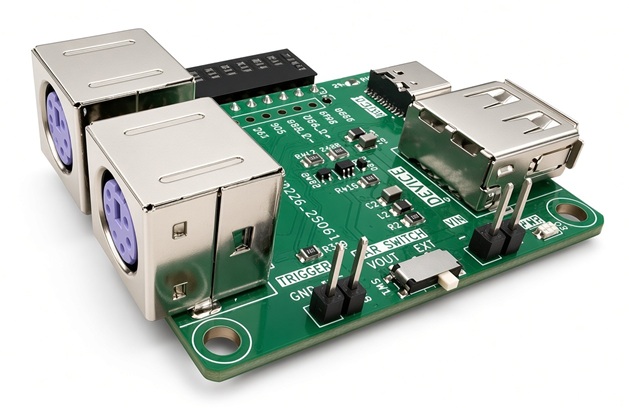
The Bus Pirate can paassivbly decode PS/2 and USB keyboard signals. PS/2 and low speed USB are decoded live: raw packets scroll past as they happen, and a key tracker rebuilds the typed text right next to them, so you read words instead of scan codes.
To make life easier, we’ve whipped up a PS/2 & USB Keyboard Sniffer adapter plank that sits inline between a keyboard and a computer. It has two PS/2 (mini-DIN 6P) connectors and two USB connectors, wired as pass-throughs so the keyboard keeps working while you capture.
PS/2 & USB Sniffer plank features:
- Two PS/2 (mini-DIN 6P) connectors and two USB connectors, wired as pass-throughs so the keyboard keeps working while you capture
- PS/2 scan code set 2 decoded to keystrokes
- Low speed USB HID boot protocol decoded to keystrokes
- A key tracker in each mode that reconstructs the typed text as a plain string
- TRIGGER output to sync an external logic analyzer to the capture
- PWR SWITCH to take bus power from the Bus Pirate VOUT supply or from the PC (EXT)
Get Bus Pirate & Accessories
Adapter pinout
| Bus Pirate pin | Label | Description |
|---|---|---|
| 1 | VOUT | Bus power, when the PWR SWITCH is in the VOUT position |
| 2 | TRIG | Trigger output to sync an external logic analyzer |
| 3 | D+ | USB D+ |
| 4 | D- | USB D- |
| 5 | RESV | Reserved |
| 6 | DAT | PS/2 data |
| 7 | CLK | PS/2 clock |
| 8 | RESV | Reserved |
| 9 | RESV | Reserved |
| 10 | GND | Common ground with the keyboard and the PC |
The Bus Pirate shows these same labels under the pin numbers in the status bar, so you can confirm the plank is wired the right way round at a glance.
Power switch
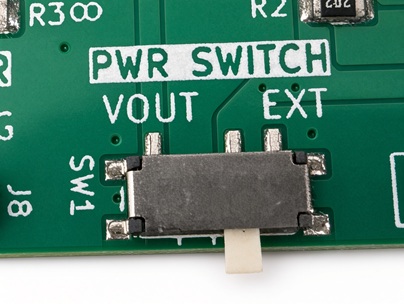
SW1 selects where the sniffed bus takes its power from. Slide it to VOUT to power the bus from the Bus Pirate supply, or to EXT to let the PC power it, exactly as it would without the plank in the way.
Both of the setups below need the PWR SWITCH in the EXT position, as in the photo. The keyboard is powered by the PC through the pass-through cables, not by the Bus Pirate.
PS/2 Keyboard Sniffer
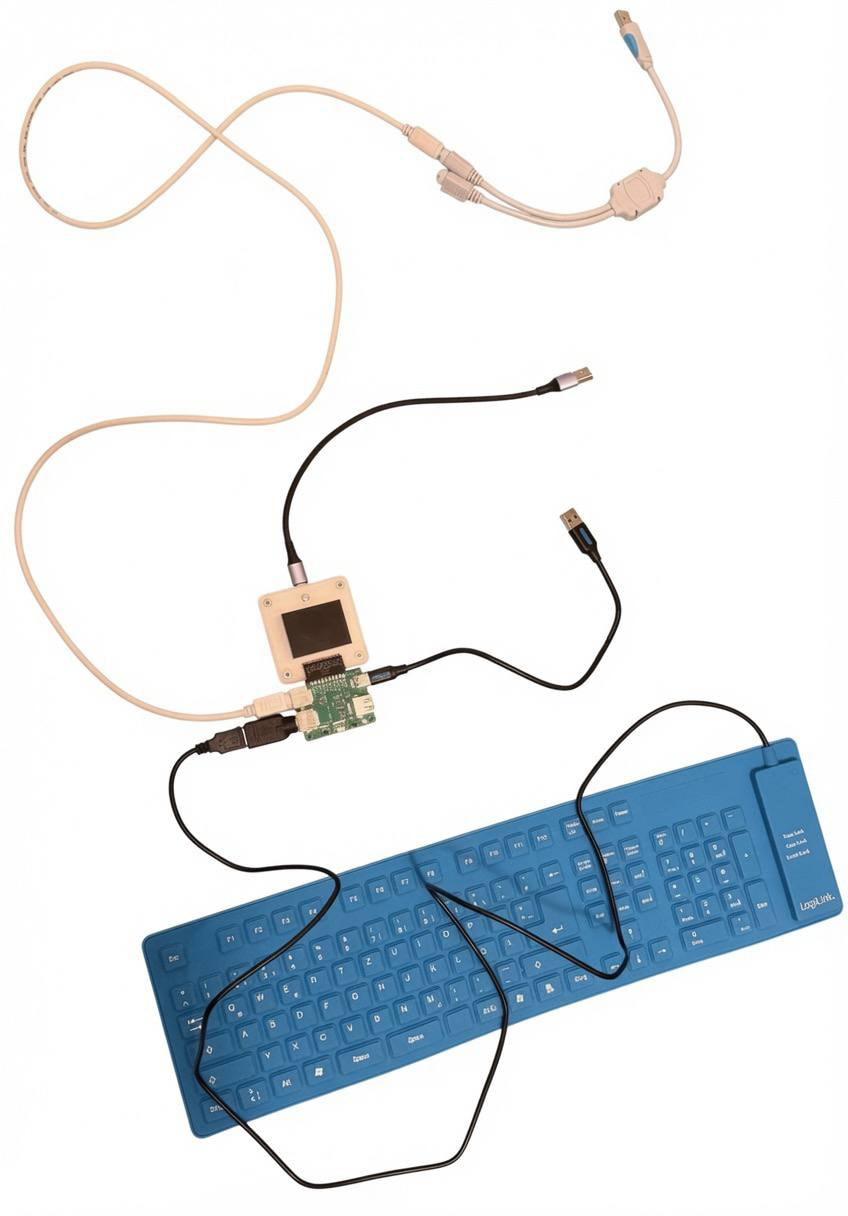
What you need:
- A PS/2 keyboard
- A PS/2 male to PS/2 male cable (MINI-DIN 6P)
- A PS/2 to USB adapter
Plug all 3 USB male connectors straight into the PC, exactly as shown in the photo. This arrangement is what makes the capture work reliably, so copy it as closely as you can. Don’t forget the PWR SWITCH in the EXT position.
Sniffing a PS/2 keyboard
- m - open the mode menu and choose PS2
- sniff - start the sniffer, press q to exit
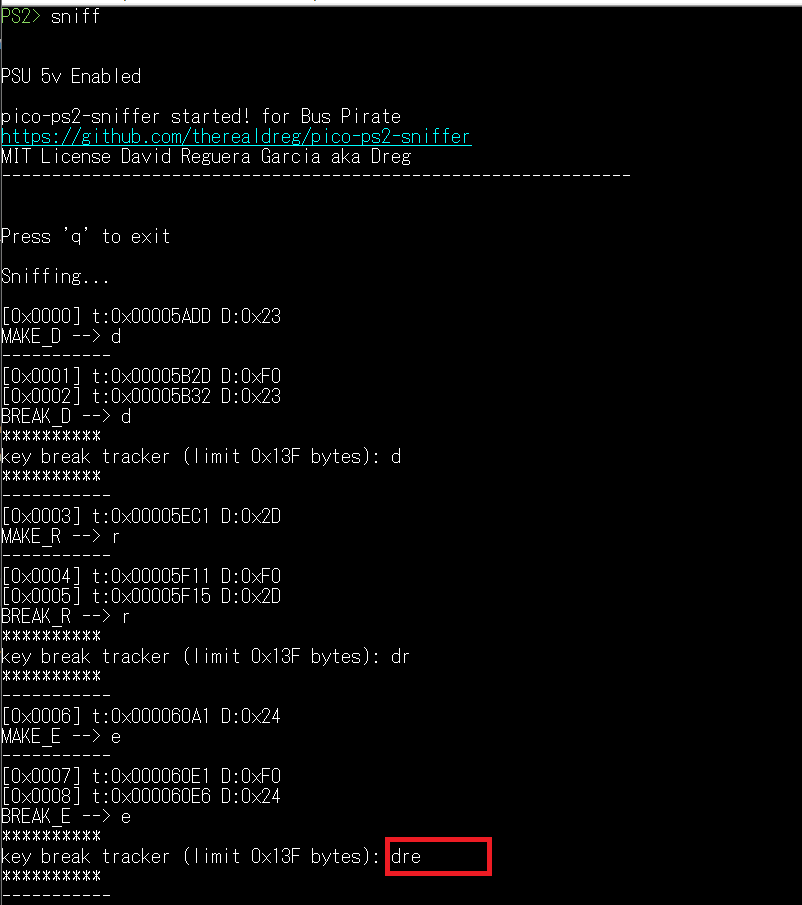
Each packet is logged as it arrives and decoded to a make or break code and the key it belongs to. Above, the word dre was typed, and the tracker line grows by one character on each key release.
USB Keyboard Sniffer
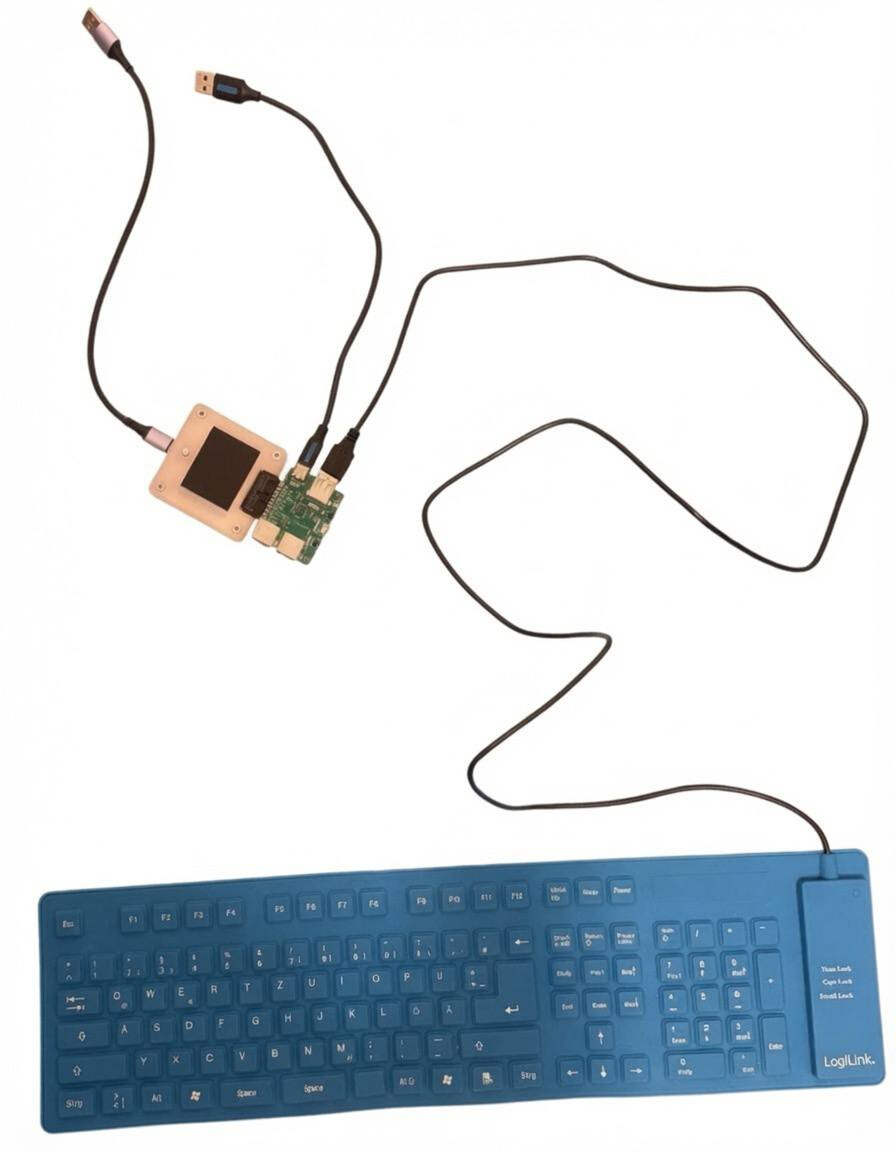
What you need:
- A low speed USB keyboard
Plug both USB male connectors straight into the PC, exactly as shown in the photo. This arrangement is what makes the capture work reliably, so copy it as closely as you can. Don’t forget the PWR SWITCH in the EXT position.
Only USB low speed (1.5Mbit/s) keyboards can be sniffed. Full speed (12Mbit/s) and high speed (480Mbit/s) devices cannot be sniffed at the moment, so check what your keyboard is before wiring anything up.
Sniffing a USB keyboard
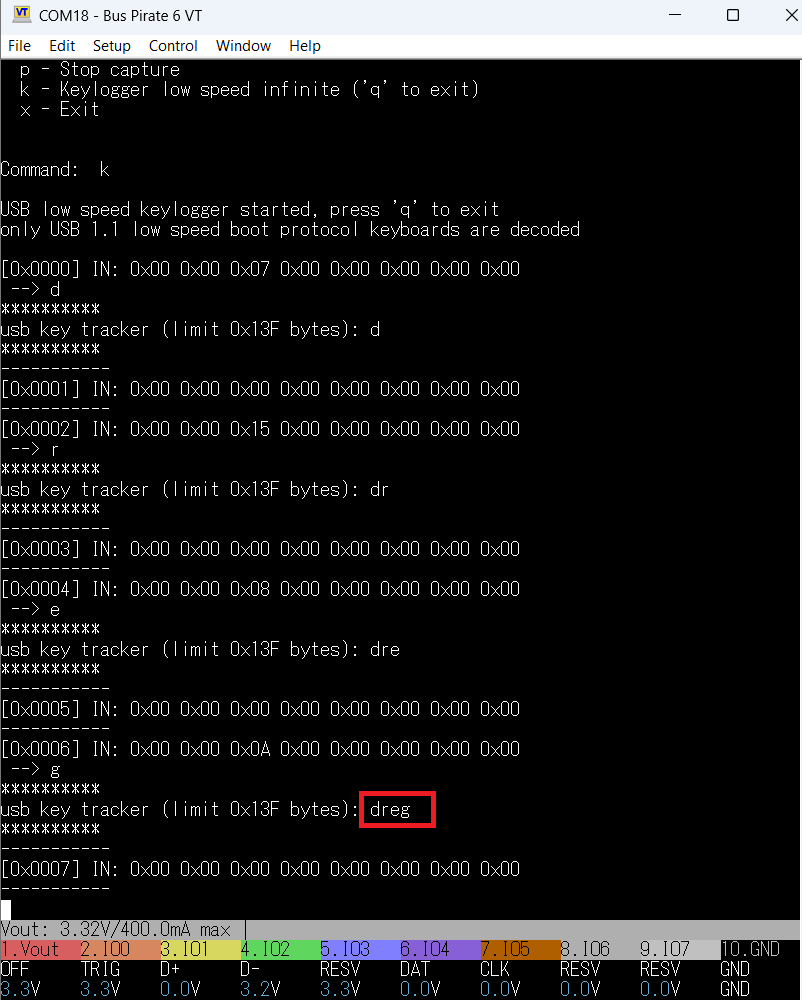
- m - open the mode menu and choose USB
- sniff - start the sniffer
- k - low speed keylogger, press q to exit
Each line is one 8-byte HID report as it came off the bus. Most are all zeros, which is the keyboard reporting that nothing is held down. Above, the word dreg was typed, and the tracker line grows by one character each time a new usage ID appears in a report.
How the key trackers work
Both sniffers decode raw bus traffic into keystrokes, but reading a scrolling dump of packets is not how you find out what somebody typed. The key tracker solves that: it is a running reconstruction of the typed text, rebuilt from the wire and reprinted every time a new key is resolved, so the transcript is always on screen next to the raw traffic that produced it.
Each mode keeps its own tracker buffer. Characters are appended to it as they are decoded, and the whole buffer is reprinted as a plain string, set apart from the packet log so it is easy to pick out.
The two implementations share that idea but arrive at it from opposite directions, because PS/2 and USB describe a keyboard in fundamentally different ways.
The PS/2 key tracker
A PS/2 keyboard is event-driven. It transmits a make code when a key goes down and a break code (the byte 0xF0, or the sequence 0xE0 0xF0 for extended keys) when it comes back up. The sniffer accumulates incoming bytes and matches them against a scan code set 2 table, holding off until exactly one entry matches the sequence, so that multi-byte extended keys are never mistaken for the single-byte keys they begin with.
The important design decision is that the tracker records on key release, not on key press. This is why it is labelled the key break tracker. A key held down under typematic auto-repeat emits its make code over and over, which would flood the transcript with duplicated characters, but it emits exactly one break code when it is finally released. Recording the break gives you one character per physical keystroke, regardless of how long the key was held.
Only keys with a printable representation reach the buffer. Modifiers, function keys and navigation keys are shown in the packet log but deliberately left out of the transcript.
The USB key tracker
A low speed USB keyboard does not announce events at all. The host polls it on a fixed interval, and the keyboard answers each poll with an 8-byte HID boot protocol report that is a snapshot of the current state: byte 0 is a modifier bitmap, byte 1 is reserved, and bytes 2 through 7 hold the usage IDs of up to six keys being held down at that instant. Nothing in the report says “this key was just pressed”.
The tracker therefore has to derive events by comparing each report against the previous one. A usage ID that appears in the new report but was absent from the last one is a newly pressed key; anything present in both is simply still held, and is ignored. This is the exact mirror image of the PS/2 approach: USB gives you state and you compute the transitions, PS/2 gives you the transitions directly.
Characters are resolved from the HID Usage Tables, a completely different numbering scheme from PS/2 scan codes — usage 0x04 is a on USB, whereas 0x1C is a on PS/2. Shift is read from the modifier bitmap (either the left or the right bit), Caps Lock is tracked as a toggle when usage 0x39 is pressed, and the two combine the way a real keyboard does: letters are uppercased when shift and caps disagree, while non-letters take their shifted symbol only when shift is held. Named keys such as Enter, F5 or the arrows are printed in the packet log but, as on the PS/2 side, kept out of the transcript.
Limits
The tracker buffer is circular. Once it fills up it wraps and begins overwriting from the start without clearing, so a long session shows newer text spliced over older text rather than a clean truncation. Treat the tracker as a live window on recent typing, and the raw packet log as the authoritative record.
Both trackers assume a US English layout, since they map codes straight to ASCII with no national keymap in between. A keyboard set to another layout produces a transcript in which the letters are broadly right but the punctuation and symbols are not.
The USB tracker additionally requires a low speed keyboard using the HID boot protocol, which covers the great majority of USB 1.1 keyboards. Full speed and high speed devices are not sniffed at all for now, and keyboards that only expose vendor-specific report descriptors are captured on the bus but are not decoded into text.
Resources
Get a Bus Pirate
Get Bus Pirate & Accessories
- Browse Complete Bus Pirate hardware collection
- Bus Pirate 5 REV10 with enclosure
- Probe Cable Kit
- Auxiliary Cable Kit
- Quick Connect Adapter
Community
Documentation
Here’s some other fun stuff you might enjoy.